


Discovered – Currently Not Indexed:
If you’re reading this, chances are you’re seeing the dreaded “Discovered – currently not indexed” status in your Google Search Console reports.
You’re not alone.
Many website owners and SEOs get frustrated when their pages are crawled but not indexed. The question is — why is Google not indexing your content and what can you do to fix it?
Let’s break it down in simple, step-by-step language.
🔍 What Does “Discovered – Currently Not Indexed” Mean?
In simple terms:
Google has found (discovered) your page URL but has not yet crawled it, which means it hasn’t read or added it to the search index.
This can be frustrating because if your page isn’t indexed, it won’t appear on Google Search at all — and that means zero organic traffic.
💡 Common Reasons for “Discovered – Currently Not Indexed”
Here are the main reasons why Google discovers your page but does not index it:
- Low Website Authority
New or low-authority websites often experience delays in indexing. - Poor Internal Linking
Google may have trouble reaching the page due to weak or no internal links. - Thin or Duplicate Content
Pages with little or copied content may not be considered valuable. - Crawl Budget Limitations
If your site has many URLs, Google prioritizes what it crawls. - Server Overload or Slow Load Time
If your server is slow, Google may postpone crawling. - Blocked in robots.txt or Noindex Tags
If you’re unknowingly blocking Google, it won’t crawl the page. - Pages Recently Published
Indexing may take time after publication.
✅ Step-by-Step Guide to Fix “Discovered – Currently Not Indexed”
Let’s fix it with these actionable steps:
🔧 1. Improve Internal Linking
- Link to the page from high-traffic or important pages on your website.
- Use descriptive anchor text.
➡ Example: Instead of “Click Here,” write “Check out our SEO Guide for Beginners.”
🚀 2. Request Manual Indexing
- Go to Google Search Console → URL Inspection Tool
- Paste your URL → Click “Request Indexing”
Do this only once per page. Don’t spam Google with repeated requests.
📄 3. Enhance Content Quality
- Add unique, helpful, and in-depth content.
- Use relevant images, subheadings, and FAQs.
- Ensure it’s mobile-friendly and fast-loading.
🔄 4. Fix Crawlability Issues
- Check if the page is:
- Blocked in robots.txt
- Marked noindex in HTML meta tags
- Use the URL Inspection Tool to confirm crawl access.
🌐 5. Build External Backlinks
- Promote your content via:
- Social media
- Guest blogging
- Forum sharing
Backlinks help Google see your page as valuable.
⏳ 6. Be Patient and Consistent
- Indexing can take days or weeks, depending on your domain.
- Keep publishing quality content regularly.
📊 Bonus: Technical Checklist
| Task | Status |
|---|---|
| Check robots.txt | ✅ |
| Remove noindex tag | ✅ |
| Improve page speed | ✅ |
| Add internal links | ✅ |
| Submit URL in Search Console | ✅ |
| Build backlinks | ✅ |
🔁 Real-Life Example (Case Study)
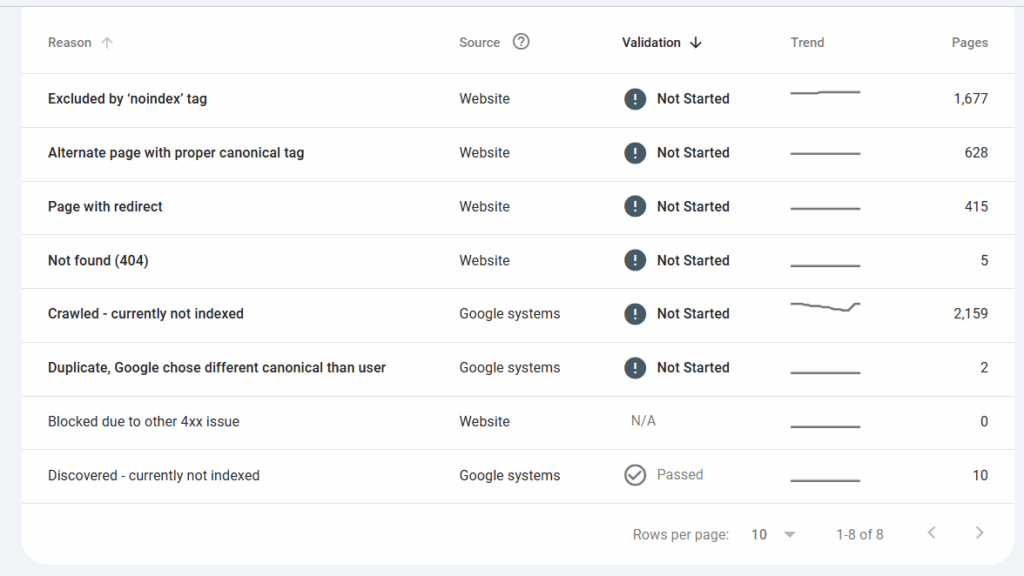
I faced this issue on one of my blog pages in early 2024. After updating the content, improving internal linking, and requesting indexing only once, the page got indexed within 48 hours.
Consistency + Patience + Quality Content = Results
🧠 Final Thoughts
Google wants to provide the best answers to users. If your content is valuable, helpful, and well-structured, it will be indexed.
So don’t panic. Take the steps above, stay consistent, and track the progress.
🪪 Written by: Vinod Vishwakarma
I help people grow online using SEO, Digital Marketing, and Smart Blogging Practices.
Let’s connect and grow together! 🚀
